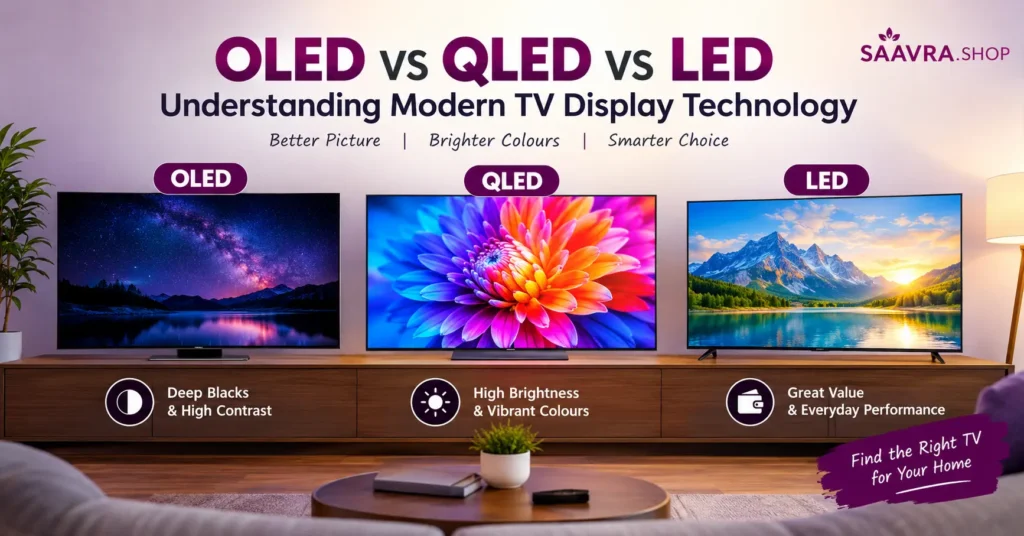
Buying a new television is no longer as simple as choosing a screen size and checking whether it supports 4K. Once you start looking at modern TVs, you will quickly come across terms such as LED, QLED, OLED, Mini LED, HDR, local dimming and refresh rate.
Among these, OLED, QLED and LED are some of the most commonly discussed display technologies.
But what do these names actually mean? Are OLED TVs always better than QLED? Is QLED really different from LED? And does buying an expensive display automatically mean getting a better viewing experience?
The answer is a little more complicated.
Different display technologies have different strengths. The right choice depends on your room lighting, the content you watch, gaming requirements, viewing distance, screen size and, of course, your budget.
So, let’s break it down in simple language.
What Is an LED TV?
Let’s start with LED because it is the technology behind a huge number of TVs available today.
Technically, most TVs marketed as “LED TVs” are actually LCD TVs that use LEDs as their backlight. The LCD panel controls the image, while LEDs provide the light needed to illuminate the screen.
In a traditional LED TV, the backlight sits behind or around the LCD panel. Depending on the model, manufacturers may use different backlighting arrangements, including edge lighting, direct lighting or full-array backlighting.
This distinction matters because two TVs both advertised as LED TVs can produce noticeably different picture quality.
Advantages of LED TVs
LED TVs remain popular for several reasons:
- Generally available at lower prices
- Available in many screen sizes
- Good brightness for everyday viewing
- Wide selection of budget and mid-range models
- Suitable for TV channels, streaming, sports and general entertainment
- Usually easier to find within a particular budget
For someone looking for a practical television without spending heavily on premium display technology, a good LED TV can still make plenty of sense.
What Is Local Dimming?
Some better LED TVs use local dimming.
Instead of treating the entire backlight as one large light source, local dimming allows different sections of the backlight to become brighter or darker independently.
This can improve contrast, particularly in scenes containing both bright and dark areas.
However, because the backlight is still illuminating an LCD panel, light can sometimes spill around bright objects on a dark background. This effect is commonly known as blooming or haloing.
What Is a QLED TV?
QLED stands for Quantum Dot Light Emitting Diode.
Despite the name, a QLED television is still fundamentally an LCD TV using an LED backlight. The important difference is the addition of a Quantum Dot layer.
Quantum dots are extremely small semiconductor particles that can help improve the way the display produces and manages colour.
In simple terms, think of QLED as an LED/LCD television with an additional technology layer designed to improve brightness and colour performance.
Samsung describes QLED TVs as using Quantum Dot technology to enhance brightness and colour compared with conventional LED TVs.
Why Does Quantum Dot Matter?
One of the biggest attractions of QLED technology is its ability to produce bright, vivid images.
This can be particularly useful when watching television in a bright living room.
For example, imagine watching a cricket match during the afternoon with sunlight coming through the windows. A bright QLED display can make the picture easier to see and can deliver punchy colours.
QLED can also be useful for HDR content, where the television needs to reproduce a wide range of brightness levels.
Advantages of QLED TVs
QLED displays can offer:
- High brightness
- Strong colour volume
- Vibrant images
- Good HDR performance
- Excellent suitability for bright rooms
- Large screen-size availability
- No OLED-style pixel-level self-emission
The exact performance still depends heavily on the individual TV model. A premium QLED and an inexpensive QLED should not automatically be expected to perform identically.
What Is an OLED TV?
OLED is fundamentally different from LED and QLED.
OLED stands for Organic Light Emitting Diode.
The major difference is that OLED pixels are self-emissive. Each pixel can produce its own light, so the television does not need a conventional separate backlight.
This changes the way the television handles black levels and contrast.
If an OLED pixel needs to display black, it can essentially switch itself off.
That means dark areas can be extremely dark, while neighbouring pixels can remain bright.
Why Are OLED Blacks So Good?
Imagine a night scene in a movie.
On a conventional backlit display, the TV needs to illuminate the panel from behind. Even when an area is supposed to be black, some light may still reach that part of the display.
OLED works differently.
A pixel displaying black can turn off, resulting in extremely deep blacks.
This creates very high contrast between bright and dark areas.
That’s one reason OLED televisions are often popular with movie and streaming enthusiasts who watch content in darker rooms.
OLED vs QLED vs LED: How Do They Actually Differ?
Here’s the easiest way to understand the basic architecture:
| Feature | LED | QLED | OLED |
|---|---|---|---|
| Basic technology | LCD + LED backlight | LCD + LED backlight + Quantum Dots | Self-emissive OLED pixels |
| Separate backlight | Yes | Yes | No |
| Black level | Good to very good depending on panel/backlight | Good to very good depending on local dimming | Excellent |
| Brightness | Good to very high depending on model | Generally very high | High, but varies by model |
| Colour | Good | Very vibrant | Excellent |
| Contrast | Depends heavily on backlight | Depends on local dimming | Excellent |
| Viewing angles | Varies by panel | Varies by panel | Generally excellent |
| Burn-in concern | Generally not an OLED-style concern | Generally not an OLED-style concern | Possible with prolonged static content |
| Typical positioning | Budget to premium | Mid-range to premium | Premium |
These are broad technology-level comparisons. Individual television models can vary significantly.
OLED vs QLED: The Biggest Difference
If you’re deciding between OLED and QLED, the most important thing to understand is how they produce light.
OLED uses self-emissive pixels.
QLED uses an LCD panel with LED backlighting and a Quantum Dot layer.
This leads to different strengths.
OLED: Pixel-Level Light Control
OLED can control individual pixels.
A black pixel can turn off while a neighbouring pixel remains bright.
This produces excellent black levels and very strong contrast.
It can be especially impressive in movies containing lots of dark scenes.
QLED: Brightness and Colour
QLED retains a backlight system and adds Quantum Dot technology.
This can provide high brightness and vibrant colour reproduction, making QLED particularly interesting for bright rooms and daytime viewing.
So instead of asking “Which technology is better?”, it is more useful to ask:
What kind of viewing environment and content do you have?
What About Mini LED and Neo QLED?
Here’s where TV terminology gets even more interesting.
You may see TVs advertised as Mini LED or Neo QLED.
Mini LED is primarily a backlighting technology. It uses much smaller LEDs than conventional LED backlights, allowing manufacturers to use many more individually controlled lighting zones.
This can improve brightness and contrast control.
Neo QLED, for example, combines Quantum Dot technology with Mini LED backlighting. Samsung describes Mini LED as allowing more precise backlight control through local dimming.
This means Mini LED TVs can sit somewhere between traditional LED/QLED designs and OLED in terms of the technology used to control light.
However, Mini LED is not the same thing as OLED.
OLED controls light at the individual pixel level, whereas Mini LED controls the backlight through zones.
Which Display Is Better for Movies?
If your main priority is watching movies and web series, contrast and black levels become very important.
OLED has a natural advantage here because individual pixels can turn off.
This can make dark movie scenes look more detailed and cinematic, especially in a dimly lit room.
For example, imagine a science-fiction movie showing a spaceship against a black sky. OLED can produce extremely dark background areas while keeping stars and bright objects visible.
A good Mini LED or QLED TV with effective local dimming can also produce impressive contrast, so the difference isn’t necessarily as dramatic in every model.
Which Is Better for a Bright Living Room?
If your television sits in a room with lots of daylight, brightness becomes more important.
Large windows, strong indoor lighting and sunlight can make a dim display harder to see.
QLED and Mini LED-based televisions can be attractive choices because high brightness is one of their strengths.
Samsung’s current guidance also distinguishes OLED’s pixel-level contrast from QLED/Neo QLED’s brightness-oriented strengths.
But don’t look at brightness alone.
Screen reflections, anti-reflective coatings, room positioning and viewing angle can also affect how comfortable the TV is to watch.
Which Is Better for Gaming?
Modern gaming puts several demands on a television.
You should look at:
- Refresh rate
- Input lag
- HDMI features
- Variable Refresh Rate (VRR)
- HDR support
- Resolution
- Response time
- Supported gaming modes
OLED can be particularly attractive for gaming because its self-emissive pixels can provide very fast response times. Some modern OLED TVs also support high refresh rates.
However, a gaming-focused QLED or Mini LED TV can also be an excellent gaming display.
So don’t buy a TV based only on the word “OLED” or “QLED”.
Check the actual specifications of the model.
What About Burn-In on OLED TVs?
This is one topic worth understanding before purchasing an OLED TV.
OLED displays can be susceptible to image retention or burn-in when static elements are displayed for prolonged periods.
For example, if the same channel logo, scoreboard or static interface remains on the screen for very long periods, there can be a risk of persistent image retention.
Modern OLED televisions include technologies designed to reduce this risk, and normal mixed-content viewing is very different from continuously displaying the same static image.
Still, if your television is going to display the same static content for many hours every day, it is worth considering this factor.
Samsung also notes that prolonged static content can affect OLED displays and recommends appropriate usage and care.
Does Screen Size Matter More Than Display Technology?
Sometimes, yes.
Imagine you have a choice between:
55-inch premium OLED
and
65-inch good-quality LED/QLED
The larger television may provide a more immersive experience, especially if your seating distance is appropriate for the larger screen.
This is why TV buying should not be reduced to simply comparing OLED, QLED and LED.
Consider the complete package:
- Screen size
- Resolution
- Display technology
- Brightness
- Contrast
- HDR support
- Refresh rate
- HDMI connectivity
- Smart TV platform
- Speakers
- Warranty
- Price
What Should You Check Before Buying a TV?
Before clicking the “Buy Now” button, take a few minutes to check the specifications.
1. Screen Size
Measure your available wall or TV cabinet space.
Also consider your viewing distance.
A larger screen isn’t automatically better if your room is small.
2. Resolution
For most modern buyers, 4K is the common sweet spot in larger TVs.
However, resolution isn’t the only factor determining picture quality.
A good-quality 4K display with strong contrast, processing and HDR performance can look significantly better than a poorly implemented display with similar resolution.
3. Refresh Rate
A higher refresh rate can make fast-moving content appear smoother.
This matters particularly for:
- Sports
- Racing games
- Action games
- Fast camera movements
Be careful with marketing terminology, though. Check the actual native refresh rate and supported input modes rather than relying only on terms such as “motion rate.”
4. HDR Support
HDR stands for High Dynamic Range.
It allows compatible content to contain a wider range of brightness and colour information.
But simply seeing “HDR” on the box doesn’t guarantee outstanding HDR performance.
Peak brightness, contrast, local dimming and panel quality all matter.
5. HDMI Ports
This is easy to overlook.
If you plan to connect:
- PlayStation
- Xbox
- Gaming PC
- Soundbar
- Streaming device
- Set-top box
make sure the TV has enough suitable HDMI ports.
6. Audio
A fantastic picture with weak sound can be disappointing.
Check speaker output and supported audio formats if sound quality is important to you.
If you’re planning to use a soundbar, also check HDMI eARC/ARC support.
A Simple Way to Choose
Still confused?
Try this simple approach.
Choose an LED TV if:
You want a practical TV at a reasonable price and don’t necessarily need premium display technology.
Consider QLED if:
You want strong brightness, vibrant colours and a television that works well in a bright living room.
Consider OLED if:
You care strongly about deep blacks, contrast, cinematic viewing and fast pixel response.
Consider Mini LED/Neo QLED if:
You want very high brightness and more precise backlight control than conventional LED/QLED designs.
Remember, these are general technology characteristics. The quality of individual TV models can vary considerably.
A Friendly Tip Before You Shop
If you’re currently searching for a new TV, don’t rush just because a model has “OLED”, “QLED” or “4K” written on the product page.
Take a look at the complete specifications and compare the actual model.
If you want to browse some TV options while researching, you can also check this Amazon option here:
Think of it as a convenient starting point rather than a recommendation that you have to follow. Compare the price, specifications, reviews, warranty and features with other models before buying.
OLED vs QLED vs LED: Final Thoughts
There isn’t one display technology that makes every other television obsolete.
LED remains a practical option with a huge range of models and prices.
QLED adds Quantum Dot technology to an LCD/LED-based design, making brightness and vibrant colour major parts of its appeal.
OLED takes a completely different approach by allowing individual pixels to produce their own light. This gives it exceptional black levels and pixel-level contrast.
And then there are newer approaches such as Mini LED, which improve backlight control while retaining an LCD-based architecture.
The best television for you ultimately depends on how and where you watch.
If you watch movies at night in a darker room, contrast may matter more.
If your living room is bright during the day, brightness may be more important.
If you’re a gamer, refresh rate, response time, VRR and HDMI capabilities deserve extra attention.
And if you’re shopping on a particular budget, don’t forget that a well-balanced TV can be a better purchase than simply chasing the most expensive display technology.
The trick is to understand what you’re actually paying for — and then choose the specifications that matter most to your viewing experience.