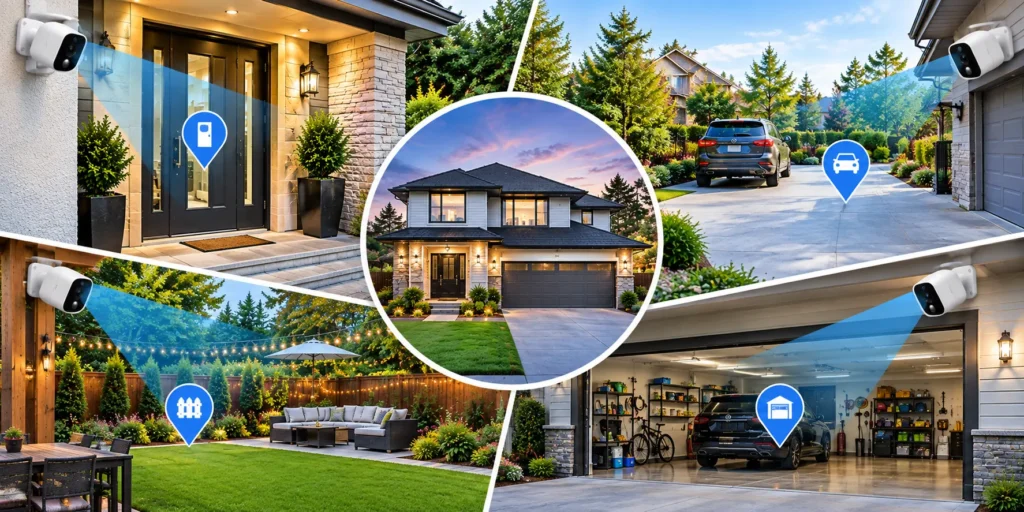
Most homes already have a doorbell camera and nothing else. Here’s how to cover the three spots it can’t see, without buying more camera than any of them needs.
A doorbell camera answers one question: who’s at the door. It has no idea what’s happening in the driveway, the backyard, or the garage side gate — the places a doorbell’s fisheye lens simply doesn’t reach. Most break-ins and package thefts happen outside that narrow field of view, which is why a single camera rarely does the job it was bought for.
The fix isn’t a bigger camera. It’s a different one for each blind spot, matched to what that spot actually needs. A driveway needs width. A backyard needs reach and tracking. A garage side door needs to run for months without anyone thinking about it. Below is a pick for each, plus the honest trade-offs and the setup habits that make any of them actually catch something.
Why a WiFi camera, and where it falls short
WiFi cameras win on flexibility: no cable run, a five-minute mount, and footage you can check from anywhere. That flexibility comes at a cost — battery models need charging or a sunny spot for a solar panel, and video quality still dips a little in a real WiFi dead zone. Neither of those is a reason to skip a camera. They’re reasons to place it well, which is most of what this guide is actually about.
Front door
Pick: Eufy Video Doorbell E340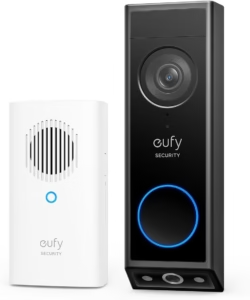
Two lenses instead of one — a wide-angle for the person, a downward angle for whatever they set on the mat. Color night vision and on-device face recognition mean you can tell “the same delivery driver as last week” from “someone new” without opening the app.
Trade-off: locked into Eufy’s ecosystem, and the fuller feature set costs more than a basic doorbell cam.
Driveway
Pick: Reolink Argus 4 Pro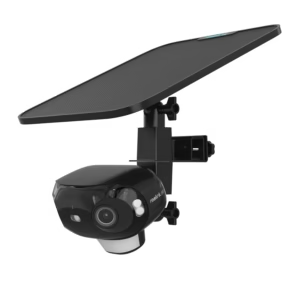
A driveway is wide, which is the one thing most battery cameras handle badly. The Argus 4 Pro stitches two lenses into a 180° view, so one mount at the top of the drive covers the full width — a car pulling in, a package on the walk, and the street behind it — where a narrower 135° camera would need a second unit to match it. Color night vision without a spotlight means it doesn’t announce itself to whoever’s on your driveway at 2 a.m.
Trade-off: the app is functional rather than polished, and the solar add-on charges noticeably slower once winter cuts daylight hours.
Backyard
Pick: Eufy SoloCam S340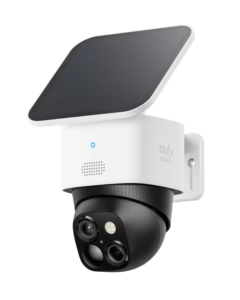
A backyard is open ground, not a fixed doorway, so a static wide-angle wastes most of its frame on grass. The SoloCam S340 pans, tilts, and adds 8x hybrid zoom, so it can follow motion across the yard and still bring back a usable image at the far fence line. Solar keeps it running without a ladder trip every few months.
Trade-off: local storage caps at 16 GB before older clips get overwritten, and it needs Eufy’s HomeBase to unlock its full feature set.
Garage or side gate
Pick: Blink Outdoor 4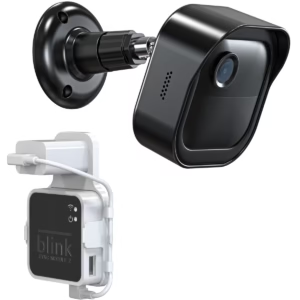
This is your lowest-traffic camera, checked rarely and mounted somewhere inconvenient to reach. Blink’s claimed two years on a set of AA lithium batteries matters more here than 4K resolution does — you want to forget this one exists until it sends an alert. It buffers locally through a Sync Module 2 if your WiFi drops for a moment, so a brief outage doesn’t leave a gap in the record.
Trade-off: the lowest image quality and slowest motion-to-recording time of the four cameras here, and it’s built around Amazon’s ecosystem.
Four cameras chosen for four different jobs beat one expensive camera trying to do all four badly.
How to mount each one so it actually works
- Height and angle: 8–10 feet up, angled down about 30°. Higher looks more thorough but shrinks faces and license plates to nothing.
- Aim across the path, not straight down it. A camera facing head-on catches someone approaching for a fraction of a second. Angled across a walkway or driveway, it catches them moving through the frame for several seconds — more time to trigger, more usable footage either way.
- Set activity zones. Every camera above lets you mask out a busy street or a neighbor’s tree. Skip this step and you’ll mute notifications entirely within a week out of alert fatigue.
- Use 2.4GHz for range, 5GHz for detail. The garage and back fence are usually your weakest WiFi spots — 2.4GHz reaches farther at a lower bitrate, which is the right trade for a camera you rarely review closely.
Pros and cons, side by side
| Camera | Street price | Strengths | Trade-offs |
|---|---|---|---|
| Eufy Video Doorbell E340 | ~₹33,000.00 | Dual camera, face recognition, color night vision | Eufy ecosystem lock-in, premium price for a doorbell cam |
| Reolink Argus 4 Pro | ~₹4,100.00 | 180° single-mount coverage, no subscription, color night vision, expandable storage | App lacks polish, solar underperforms in winter |
| Eufy SoloCam S340 | ~₹26,500.00 | Pan-tilt-zoom, solar power, best app of this group | 16GB local cap, needs a HomeBase hub for full features |
| Blink Outdoor 4 | ~₹2,000.00 | Up to two years on AA batteries, local buffering on WiFi drop, lowest price | Weakest image quality, slower alerts, Amazon-only ecosystem |
What this actually costs over five years
None of the four cameras above requires a monthly fee to keep working — footage lands on a local microSD card or, for the doorbell, Eufy’s on-device storage. Compare that to a subscription-based two-camera setup: a $399 pair plus a $12.99/month plan clears $1,100 over five years. Buy once, own the footage, and the four-camera setup above still comes in under that number combined.
Do you need all four at once?
No — buy for the blind spot that worries you most first. A doorbell camera alone covers the front door reasonably well already; the driveway and backyard are usually the two gaps worth closing next, with the garage side gate as the cheapest add later.
Quick answers
Will these work if my WiFi is weak at the edge of my property?
2.4GHz reaches noticeably farther than 5GHz. If a spot still won’t connect, a WiFi extender aimed at that corner usually fixes it before you need a cellular camera.
What about renting?
Every camera here mounts with screws into siding or trim, not the structure itself — patchable on move-out. If you can’t drill at all, a battery camera on an adhesive or magnetic mount loses some stability but avoids the walls entirely.
How long does footage actually stay on local storage?
It depends on card size and motion frequency, but a 128GB card on a low-traffic camera like the garage pick typically holds several weeks of clips before older footage cycles out.
The takeaway
Cover the front door, the driveway, the backyard, and the garage side gate — each with the camera built for that job — and you’ve closed the gaps a single doorbell camera leaves wide open, usually for less than one subscription-based camera would cost you in fees alone.